
You are using an out of date browser. It may not display this or other websites correctly.
You should upgrade or use an alternative browser.
You should upgrade or use an alternative browser.
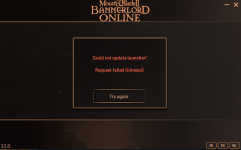
game launcher wont update
- Thread starter lucassis
- Start date

It's possible that restarting your computer will resolve the error. If you're experienced with computers, you could disable/enable your network device as well (rebooting does the same).
If that doesn't work, there's something in your security (firewall/antivirus) that's not allowing the connection.

 bannerlord-online.com
If that doesn't work, there's something in your security (firewall/antivirus) that's not allowing the connection.
(Guide) Request failed (timeout)
Troubleshooting Guide You're trying to update or launch Bannerlord Online and you've received this error message? Then read this post on how to resolve this. Error: Could not update launcher! Request failed (timeout) This error occurs when a problem in the connection between you and the...
bannerlord-online.com
already tried all of that...It's possible that restarting your computer will resolve the error. If you're experienced with computers, you could disable/enable your network device as well (rebooting does the same).
If that doesn't work, there's something in your security (firewall/antivirus) that's not allowing the connection.
(Guide) Request failed (timeout)
Troubleshooting Guide You're trying to update or launch Bannerlord Online and you've received this error message? Then read this post on how to resolve this. Error: Could not update launcher! Request failed (timeout) This error occurs when a problem in the connection between you and the...
already tried all of that...
Then you can either hope for it to resolve itself, which I can't garantee, but is possible if the regional update server is unresponsive.
Or you can use a VPN set to a different region/country, so it will connect to a different update server. A VPN will also bypass whatever security on your end may be blocking the connection.
ive kinda figered out how to fix it but not really. so every time i turn off my pc the game doesnt want to launch after so i have to reinstall and remove it and add it back to my firewall access. really annoying to do but atleast i can play nowThen you can either hope for it to resolve itself, which I can't garantee, but is possible if the regional update server is unresponsive.
Or you can use a VPN set to a different region/country, so it will connect to a different update server. A VPN will also bypass whatever security on your end may be blocking the connection.
ive kinda figered out how to fix it but not really. so every time i turn off my pc the game doesnt want to launch after so i have to reinstall and remove it and add it back to my firewall access. really annoying to do but atleast i can play now
I'm certainly not experienced with networking, but I do know when a PC reboots, it reestablishes connection to the DNS. Maybe your computer/router is set up to give a random local IP to your computer that makes the firewall see it as a different rule.