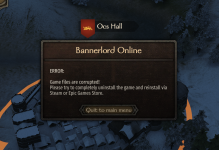
A alexpollg Recruit Sep 26, 2022 1 0 1 Oct 14, 2022 #1 I have reinstalled the game, the mods have been reinstalled, and the Settings files under system documentation have been removed. But the same error message still appears Reactions: EchoShima and YungChukaSmoke
I have reinstalled the game, the mods have been reinstalled, and the Settings files under system documentation have been removed. But the same error message still appears
S Suwerren Recruit Oct 14, 2022 1 0 1 Oct 14, 2022 #2 Having the same problem, reinstalled, deleted every file I could find, even did the same thing with mod but still doesn't work.
Having the same problem, reinstalled, deleted every file I could find, even did the same thing with mod but still doesn't work.
P ProrokFYNTK Recruit Oct 14, 2022 1 0 1 Oct 14, 2022 #4 same here, checked files consistency via steam, reinstalled both game and online launcher, and still doesn't work
same here, checked files consistency via steam, reinstalled both game and online launcher, and still doesn't work
YungChukaSmoke Recruit Oct 14, 2022 1 0 1 Oct 14, 2022 #5 Just downloaded the mod and thought i had done something wrong, but i am getting the exact same error everytime.
Just downloaded the mod and thought i had done something wrong, but i am getting the exact same error everytime.
EchoShima Recruit Oct 14, 2022 1 0 1 Oct 14, 2022 #6 I have the same problem like these fine gentlemen
К КнязьОлег Recruit Jun 25, 2021 3 2 3 Oct 14, 2022 #7 guys, just choose in game preferences in steam Beta version -> No and update game. If you still have a problem, verify local files Reactions: alexpollg
guys, just choose in game preferences in steam Beta version -> No and update game. If you still have a problem, verify local files